
Overview
Action Chat allows you to provide feedback directly within your conversations. If a response is inaccurate, unhelpful, or doesn't meet your expectations, you can share feedback with the Action team to help improve your experience.
You can also like helpful responses or copy information from a conversation using the response controls.
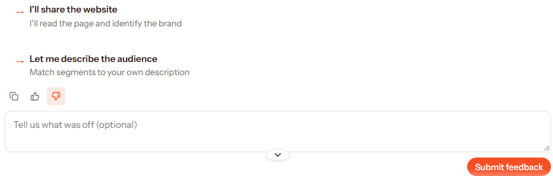
Submit Feedback on a Response
If you're unsatisfied with a response or experience an issue, you can submit feedback directly to the Action team.
- Hover over the response you want to provide feedback on to reveal the response controls.
- Click the thumbs down icon.
- In the "Tell us what was off (optional)" field, describe what went wrong and what you expected instead.
- Click Submit feedback to send your feedback to the Action team.
Your feedback is sent directly to the Action team for investigation and resolution.
Tip: Providing specific details about what was incorrect or missing can help the team better understand the issue.
Like a Response
If you find a response helpful, you can provide positive feedback.
- Hover over the response to reveal the available controls.
- Click the thumbs up icon to like the response.
Copy a Response
You can also copy an Action Chat response to use in another document, message, or application.
- Hover over the response you want to copy.
- Click the copy icon.
- Paste the copied content wherever you need it.
Additional Information
The feedback, like, and copy controls are available when you hover over a response in Action Chat. You can use these options throughout your conversations to provide feedback or reuse helpful information.