---
title: The Audience Tab
description: Learn how to use the Audience tab to understand the demographics and characteristics of the people who engage with an influencer's content.
---
[Skip to content](https://knowledge.audiense.com/demand/en/knowledge/demand-intelligence/the-audience-tab#main-content)
English
Show submenu for translations

Open main navigation
Close main navigation
- English
Show submenu for translations
- [Contact us](https://share.hsforms.com/1Q15CYppjRb-bFgd0CZZWwg4k1o4)
[Contact us](https://share.hsforms.com/1Q15CYppjRb-bFgd0CZZWwg4k1o4)
How can we help you?
- There are no suggestions because the search field is empty.
1. [Demand Knowledge Base](https://knowledge.audiense.com/demand?hsLang=en)
2. [Influencer Reports](https://knowledge.audiense.com/demand/influencer-reports?hsLang=en)
3. [Influencer Report Results](https://knowledge.audiense.com/demand/influencer-reports?hsLang=en#influencer-report-results)
# The Audience Tab
## Learn how to use the Audience tab to understand the demographics and characteristics of the people who engage with an influencer's content.
### **Overview**
The Audience tab helps you understand who is engaging with an influencer's content by providing demographic and audience insights for their followers and active engagers.
Depending on the social platform, you can analyze different audience segments, such as followers, likers, or commenters, to better understand how engagement varies across communities.
These insights help you determine whether an influencer's audience aligns with your target audience and identify the characteristics of the people most actively engaging with their content.
---
### **Audience Types**
The audience segments available depend on the social platform being analyzed.
#### **Instagram**
For Instagram reports, audience insights are available for:
- Followers
- Likers
You can switch between these audience types to compare the characteristics of people who follow the influencer with those who actively engage by liking their content.
This comparison can help you understand whether engagement comes primarily from existing followers or from a broader audience.

> **Note:** Audience Type selection is currently available only for **Instagram** Influencer Reports.
#### **YouTube**
For **YouTube** reports, audience insights are available for:
- Subscribers
- Commenters
In addition to understanding the influencer's subscriber base, you can analyze the audience that actively participates in conversations through comments.
This provides additional context about the community driving engagement around the influencer's content.

---
### **Age & Gender Distribution**
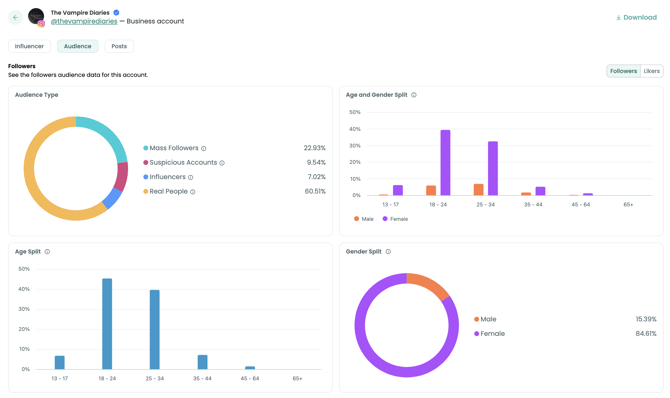
The Audience tab separates Age and Gender into individual charts rather than combining them into a single visualization.
This makes it easier to independently analyze:
- Gender distribution
- Age distribution
By separating these insights, you can more clearly identify which audience segments are most engaged.
### **Why Is This Useful?**
Separate visualizations make it easier to:
- Identify the influencer's primary audience.
- Compare followers with active engagers.
- Evaluate how closely an influencer's audience aligns with your target audience.
- Understand engagement patterns across different demographic groups.
---
### **Additional Audience Insights**
The Audience tab also provides several additional audience characteristics.
---
### **Audience Location**
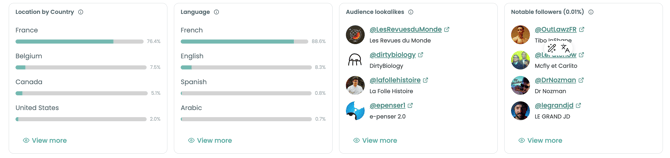
The Location by Country section estimates where audience members are located.
Locations are determined by analyzing signals such as:
- Location tags
- Profile information
- Languages used in captions
- Recent posts
These insights help identify the countries where the influencer's audience is most concentrated.
---
### **Language**
The Language section identifies the primary languages used by the influencer's audience.
Language is determined by analyzing captions and other publicly available content from recent activity.
Understanding audience language can help support campaign planning, localization, and content strategy.
---
### **Audience Lookalikes**
The Audience Lookalikes section identifies influencers with audiences that share similar characteristics.
This insight can help you:
- Discover additional influencers.
- Expand influencer campaigns.
- Identify creators with comparable audiences.
- Build influencer shortlists.
---
### **Notable Followers**
The Notable Followers section highlights influential members of the influencer's audience.
These followers represent the top 0.01% of followers who have more than 1,000 followers themselves.
This can help identify:
- Influential audience members
- Potential collaborators
- Brand advocates
- Secondary influencer opportunities
---
Best Practices
Use the **Audience** tab to determine whether an influencer's audience matches the audience you want to reach.
Combining demographic insights with engagement data helps you:
- Validate influencer fit before launching campaigns.
- Compare audience composition across platforms.
- Identify highly engaged audience segments.
- Improve influencer selection and campaign targeting.
For the most complete analysis, review the Audience tab alongside the **Influencer** and **Content** tabs.
---
Related Articles
- Influencer Tab
- Content Tab
- Understanding Influencer Reports
- Understanding Engagement Metrics
- Discover Similar Influencers
The **Audience Tab** helps you explore who engages with an influencer’s content providing insights into the demographics and characteristics of their followers, likers, or commenters.
This section allows you to **compare audience segments** and understand **how engagement patterns differ** depending on the social platform.
### Platform Differences
Each platform provides unique audience data. Here’s how it varies:
- **Instagram:** audience insights are typically based on **Followers** and **Likers**. You can **switch views** to compare the characteristics of these two groups, for example, to see how closely the profiles of followers align with those actively engaging with posts.

- **YouTube**: audience insights extend further. In addition to **Followers (Subscribers)**, you can also explore the characteristics of **Commenters**, offering a deeper understanding of the community driving discussions and reactions.

### Age & Gender Distribution
Unlike most social platforms that combine **age** and **gender** into one chart, the **Audience Tab** shows them **separately** with one graph for **gender** and another for **age**. This makes it easier to clearly see how different age groups and genders engage with the influencer.
**Why it matters?** It helps quickly identify which audience segments are most engaged, compare followers with active engagers, see how well an influencer’s audience matches your target audience.

💡: Note that **Audience type** is only available for Influencer Report from Instagram
### Other useful metrics
- **Location by Country:** Followers' location determined by analyzing location tags and language of recent posts, captions, and bios.
- **Language:** We determine historical followers langauge by analyzing caption of recent posts.
- **Audience lookalikes:** Audience lookalikes help you find influencers that have similar audience.
- **Notable followers (0.01%):** Top followers of this user with more than 1,000 followers.
- [About Demand Intelligence](https://knowledge.audiense.com/demand/about-demand-intelligence?hsLang=en#main-content)
- [About](https://knowledge.audiense.com/demand/about-demand-intelligence?hsLang=en#about)
- [Features](https://knowledge.audiense.com/demand/about-demand-intelligence?hsLang=en#features)
- [Frequently Asked Questions](https://knowledge.audiense.com/demand/about-demand-intelligence?hsLang=en#frequently-asked-questions)
- [Creator Discovery](https://knowledge.audiense.com/demand/creator-discovery?hsLang=en#main-content)
- [About](https://knowledge.audiense.com/demand/creator-discovery?hsLang=en#about)
- [Results](https://knowledge.audiense.com/demand/creator-discovery?hsLang=en#results)
- [Frequently Asked Questions](https://knowledge.audiense.com/demand/creator-discovery?hsLang=en#frequently-asked-questions)
- [Demand Reports](https://knowledge.audiense.com/demand/demand-reports?hsLang=en#main-content)
- [About](https://knowledge.audiense.com/demand/demand-reports?hsLang=en#about)
- [Report Results](https://knowledge.audiense.com/demand/demand-reports?hsLang=en#report-results)
- [Use cases](https://knowledge.audiense.com/demand/demand-reports?hsLang=en#use-cases)
- [Frequently Asked Questions](https://knowledge.audiense.com/demand/demand-reports?hsLang=en#frequently-asked-questions)
- [Influencer Reports](https://knowledge.audiense.com/demand/influencer-reports?hsLang=en#main-content)
- [Influencer Report Results](https://knowledge.audiense.com/demand/influencer-reports?hsLang=en#influencer-report-results)
- [Frequently Asked Questions](https://knowledge.audiense.com/demand/influencer-reports?hsLang=en#frequently-asked-questions)
- [Overlap Reports](https://knowledge.audiense.com/demand/overlap-reports?hsLang=en#main-content)
- [About](https://knowledge.audiense.com/demand/overlap-reports?hsLang=en#about)
- [Report Results](https://knowledge.audiense.com/demand/overlap-reports?hsLang=en#report-results)
- [Use Cases](https://knowledge.audiense.com/demand/overlap-reports?hsLang=en#use-cases)
- [Frequently Asked Questions](https://knowledge.audiense.com/demand/overlap-reports?hsLang=en#frequently-asked-questions)
- [FAQs](https://knowledge.audiense.com/demand/faqs?hsLang=en)
[-1.svg "Audiense Logo (1)-1")](http://www.buxtonco.com)
[mailto:email@email.com](mailto:email@email.com)
Copyright © 2026, Buxton