---
title: Will I Receive a Report for Requested Entities?
description: Learn what happens after requesting new entities and why reports are not generated until those entities have been added to the platform.
---
[Skip to content](https://knowledge.audiense.com/demand/en/knowledge/demand-intelligence/will-i-receive-a-report-for-requested-entities#main-content)
English
Show submenu for translations

Open main navigation
Close main navigation
- English
Show submenu for translations
- [Contact us](https://share.hsforms.com/1Q15CYppjRb-bFgd0CZZWwg4k1o4)
[Contact us](https://share.hsforms.com/1Q15CYppjRb-bFgd0CZZWwg4k1o4)
How can we help you?
- There are no suggestions because the search field is empty.
1. [Demand Knowledge Base](https://knowledge.audiense.com/demand?hsLang=en)
2. [FAQs](https://knowledge.audiense.com/demand/faqs?hsLang=en)
# Will I Receive a Report for Requested Entities?
## Learn what happens after requesting new entities and why reports are not generated until those entities have been added to the platform.
### **Overview**
No. Reports are not automatically generated when you request new entities.
Demand reports are designed to compare multiple entities within a broader analysis. Because a requested entity is typically intended to be analyzed alongside other entities, generating a report before it has been added to the Entities database would not provide a complete or meaningful comparison.
Instead, once your requested entities have been reviewed and added to the platform, you'll receive a notification so you can create your report.
---
### **What Happens After I Submit an Entity Request?**
After submitting your request:
- Our team reviews the requested entities.
- Approved entities are added to the Entities database.
- You'll receive an email confirming that your requested entities are now available.
- You can then return to the platform and create a new Demand report using those entities.
> **Note:** Reports must be created manually after the requested entities become available.
---
### **Email Notification**
Once your entities have been added, you'll receive an email confirming that they're ready to use.
The email includes the final list of approved entity names.
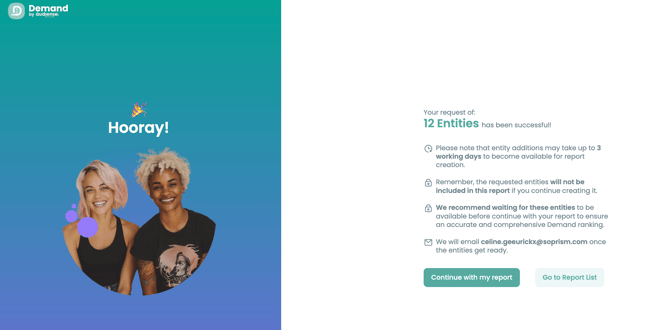
> **Tip:** We recommend copying and pasting the entity names directly from the email when creating your report. This helps ensure you're selecting the correct entities and avoids spelling or formatting errors.
---
### **Why Isn't a Report Generated Automatically?**
Demand reports are built around comparisons between multiple entities.
Generating a report for only the newly requested entities could result in incomplete or misleading insights, particularly if those entities are intended to be analyzed alongside competitors, brands, or other organizations.
Waiting until the entities have been added allows you to build a complete report using the full set of entities you want to compare.
- [About Demand Intelligence](https://knowledge.audiense.com/demand/about-demand-intelligence?hsLang=en#main-content)
- [About](https://knowledge.audiense.com/demand/about-demand-intelligence?hsLang=en#about)
- [Features](https://knowledge.audiense.com/demand/about-demand-intelligence?hsLang=en#features)
- [Frequently Asked Questions](https://knowledge.audiense.com/demand/about-demand-intelligence?hsLang=en#frequently-asked-questions)
- [Creator Discovery](https://knowledge.audiense.com/demand/creator-discovery?hsLang=en#main-content)
- [About](https://knowledge.audiense.com/demand/creator-discovery?hsLang=en#about)
- [Results](https://knowledge.audiense.com/demand/creator-discovery?hsLang=en#results)
- [Frequently Asked Questions](https://knowledge.audiense.com/demand/creator-discovery?hsLang=en#frequently-asked-questions)
- [Demand Reports](https://knowledge.audiense.com/demand/demand-reports?hsLang=en#main-content)
- [About](https://knowledge.audiense.com/demand/demand-reports?hsLang=en#about)
- [Report Results](https://knowledge.audiense.com/demand/demand-reports?hsLang=en#report-results)
- [Use cases](https://knowledge.audiense.com/demand/demand-reports?hsLang=en#use-cases)
- [Frequently Asked Questions](https://knowledge.audiense.com/demand/demand-reports?hsLang=en#frequently-asked-questions)
- [Influencer Reports](https://knowledge.audiense.com/demand/influencer-reports?hsLang=en#main-content)
- [Influencer Report Results](https://knowledge.audiense.com/demand/influencer-reports?hsLang=en#influencer-report-results)
- [Frequently Asked Questions](https://knowledge.audiense.com/demand/influencer-reports?hsLang=en#frequently-asked-questions)
- [Overlap Reports](https://knowledge.audiense.com/demand/overlap-reports?hsLang=en#main-content)
- [About](https://knowledge.audiense.com/demand/overlap-reports?hsLang=en#about)
- [Report Results](https://knowledge.audiense.com/demand/overlap-reports?hsLang=en#report-results)
- [Use Cases](https://knowledge.audiense.com/demand/overlap-reports?hsLang=en#use-cases)
- [Frequently Asked Questions](https://knowledge.audiense.com/demand/overlap-reports?hsLang=en#frequently-asked-questions)
- [FAQs](https://knowledge.audiense.com/demand/faqs?hsLang=en)
[-1.svg "Audiense Logo (1)-1")](http://www.buxtonco.com)
[mailto:email@email.com](mailto:email@email.com)
Copyright © 2026, Buxton