---
title: Create an audience in Connect based on a Monitoring from Tweet Binder
description: Learn how to export authors from a Tweet Binder Monitoring, import them into Audiense Connect, and create reusable audiences for analysis, engagement, and activation.
---
[Skip to content](https://knowledge.audiense.com/en/knowledge/knowledge/create-an-audience-in-connect-based-on-a-monitoring#main-content)
English
Show submenu for translations

Open main navigation
Close main navigation
- English
Show submenu for translations
- [Contact us](https://share.hsforms.com/1Q15CYppjRb-bFgd0CZZWwg4k1o4)
[Contact us](https://share.hsforms.com/1Q15CYppjRb-bFgd0CZZWwg4k1o4)
How can we help you?
- There are no suggestions because the search field is empty.
1. [Insights & Connect Knowledge Base](https://knowledge.audiense.com/en/knowledge?hsLang=en)
2. [Audiense Connect](https://knowledge.audiense.com/en/knowledge/audiense-connect?hsLang=en)
3. [Audiences](https://knowledge.audiense.com/en/knowledge/audiense-connect?hsLang=en#audiences)
# Create an audience in Connect based on a Monitoring from Tweet Binder
## Learn how to export authors from a Tweet Binder Monitoring, import them into Audiense Connect, and create reusable audiences for analysis, engagement, and activation.
A powerful use case is to be able to **create an audience with the authors of the Tweets** of a Monitoring. You can use this audience for **X Ads** or browse the users on '**My Community'** to further refine the users. Even go further and cluster the members of this audience to understand their affinity or interconnectivity within Audiense Insights (we cover this later).
You can **add/create an audience from a Monitoring in Connect** following these steps:
- **Export to Audiense from Tweet Binder:** this will download a TXT file
- **Upload your TXT file to Connect** to view the community
- **Or select this TXT within the Audience Manager** to add other criteria and create a new audience
### **From Tweet Binder**
Click on **Download** from the top menu within your report and select **Export to Audiense**
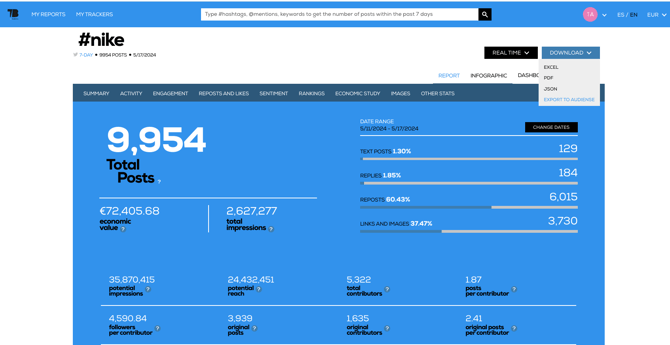
You will get the authors of these tweets as a **TXT file in your downloads**, which is the format you need to then upload them into Audiense Connect (this is a manual process at the moment, but we are going to integrate this step in the near future).
### Within **Audiense Connect**
You can **upload your TXT file** by going to **Audiences** on the top menu and selecting **Add Contacts source**
**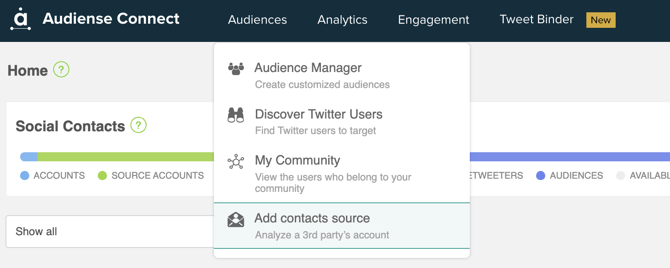**
Select **Import users from a TXT file on the left menu** and **upload a file**
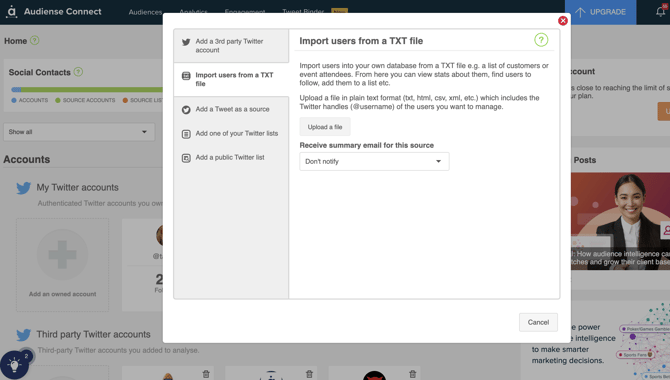
This will take a few minutes
Once ready you can opt to be emailed, but it won't take long, so you can wait to see a message that the TXT has been synched.
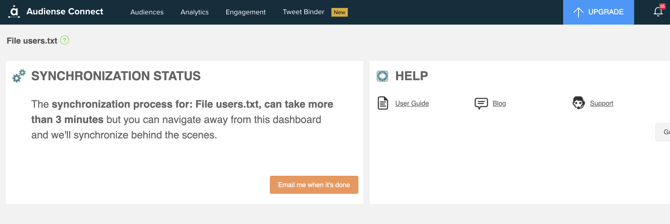
Click on the All members widget (number) to view the community and use the functionality within Connect, such as the follow mode button, or any of the views or filters.
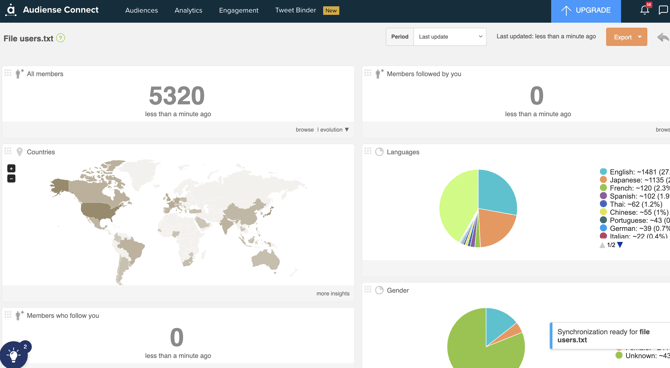
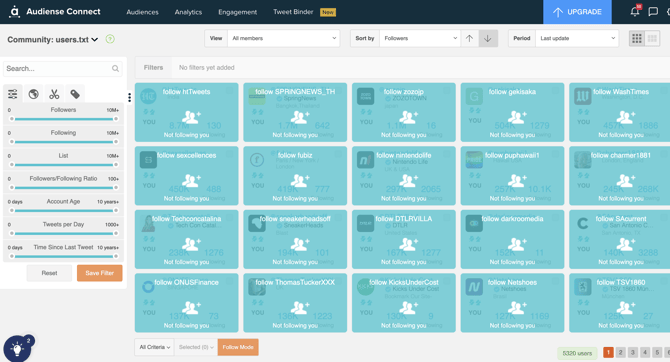
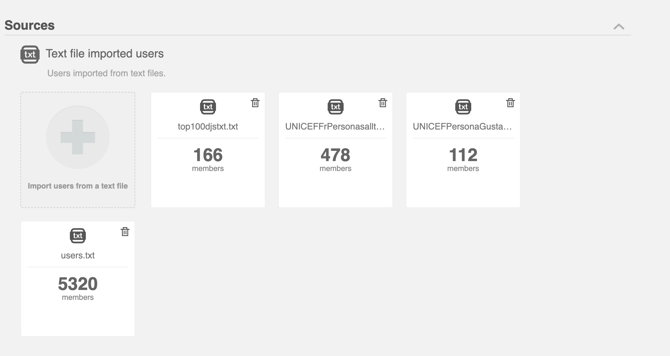
You can also access the **TXT upload function** (+ button) or select the audience from the main dashboard any time under **Sources.**
### In Audiense Connect - create a new audience with your TXT export
#### 1. Create a new audience with your TXT file as it is
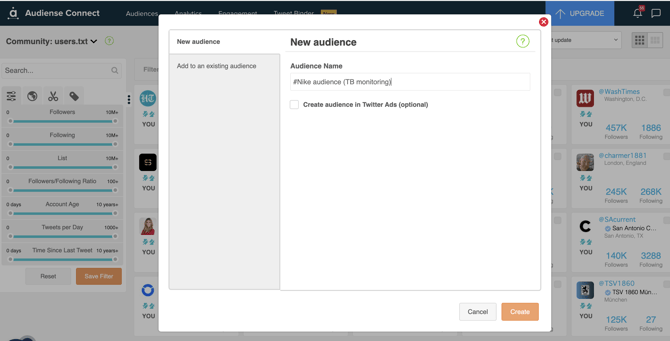
- If you just want to create an audience with the members as they are, you can do this within the Community wall via ***All Criteria\>Add to Audience***
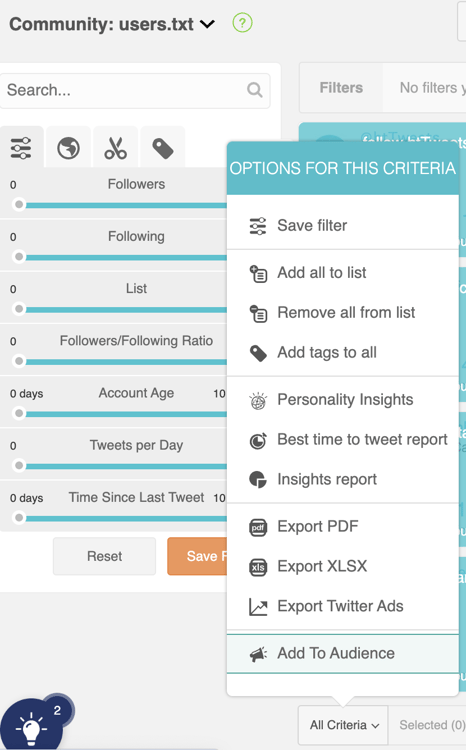
- Select ***New audience*** and ***give it a name***, then hit ***Create***
****
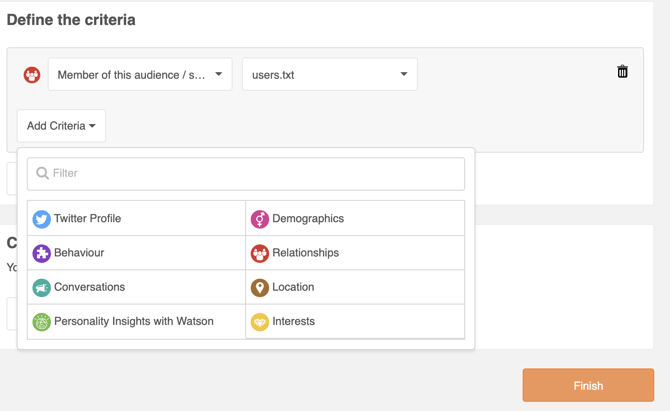
#### 2. Create a new audience (add criteria in the audience manager)
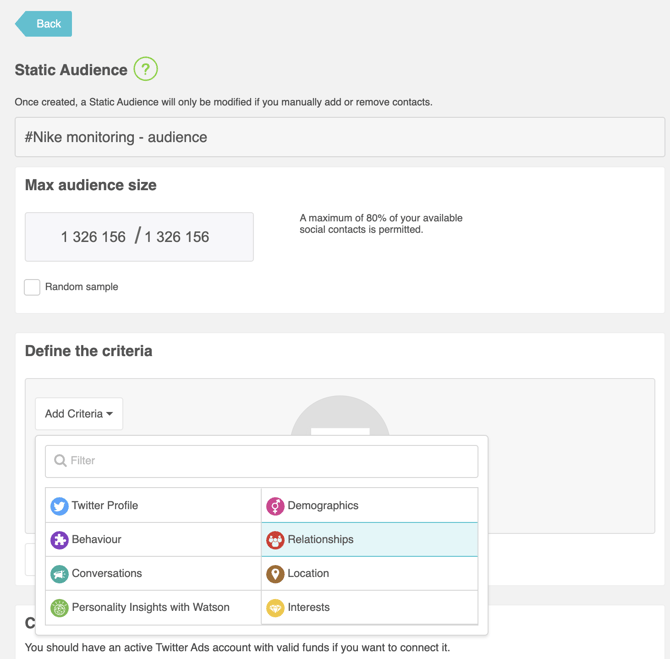
If you want to filter this audience further by applying other criteria, go to ***Audiences***on the top menu within Connect and select ***Audience Manager\>Static audience***
- Select ***Relationships*** from the criteria options
(**top tip:** after giving your audience a name, also adjust the max audience size on the left, depending on your total Social Contacts - usually anything from 100K is a good example. Most likely won't exceed the amount, but it's best practice not to use up your social contacts by adjusting this field)
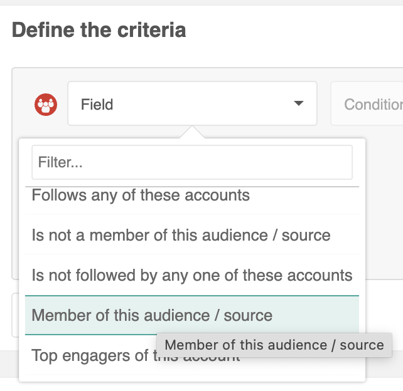
- Select ***Members of this audience/source***
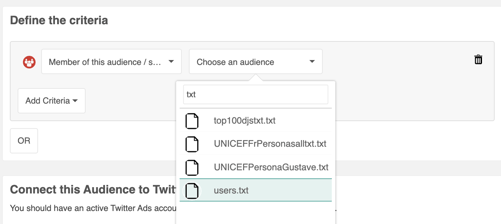
- Search for your **audience** **name** and select it
**Choose any other criteria** you'd like to **apply to this audience** and hit***Finish*** (be mindful that the more criteria you apply, the smaller the audience will be, as you would be applying filters - so you may opt for option 1 if not sure.
**Read this article:** [Create an Audiense Insights report](https://help.audiense.com/knowledge/create-an-insights-report-based-on-a-monitoring)[with the members of your monitoring.](https://help.audiense.com/knowledge/create-an-insights-report-based-on-a-monitoring)
- [Getting Started](https://knowledge.audiense.com/en/knowledge/getting-started?hsLang=en#main-content)
- [Getting started with Audiense Insights](https://knowledge.audiense.com/en/knowledge/getting-started?hsLang=en#getting-started-with-audiense-insights)
- [Getting started with Audiense Connect (Twitter Marketing Plan)](https://knowledge.audiense.com/en/knowledge/getting-started?hsLang=en#getting-started-with-audiense-connect-twitter-marketing-plan)
- [Audiense Insights](https://knowledge.audiense.com/en/knowledge/audiense-insights?hsLang=en#main-content)
- [Audience Intelligence Reports](https://knowledge.audiense.com/en/knowledge/audiense-insights?hsLang=en#audience-intelligence-reports)
- [Audiense TikTok Insights](https://knowledge.audiense.com/en/knowledge/audiense-insights?hsLang=en#audiense-tiktok-insights)
- [Audiense Integrations](https://knowledge.audiense.com/en/knowledge/audiense-insights?hsLang=en#audiense-integrations)
- [Video Tutorials & Strategic Guides](https://knowledge.audiense.com/en/knowledge/audiense-insights?hsLang=en#video-tutorials-strategic-guides)
- [Audiences: types and definitions](https://knowledge.audiense.com/en/knowledge/audiense-insights?hsLang=en#audiences-types-and-definitions)
- [How our customers use Audiense Insights](https://knowledge.audiense.com/en/knowledge/audiense-insights?hsLang=en#how-our-customers-use-audiense-insights)
- [Audiense Connect](https://knowledge.audiense.com/en/knowledge/audiense-connect?hsLang=en#main-content)
- [Basic Navigation](https://knowledge.audiense.com/en/knowledge/audiense-connect?hsLang=en#basic-navigation)
- [Audiences](https://knowledge.audiense.com/en/knowledge/audiense-connect?hsLang=en#audiences)
- [Analytics](https://knowledge.audiense.com/en/knowledge/audiense-connect?hsLang=en#analytics)
- [Engagement](https://knowledge.audiense.com/en/knowledge/audiense-connect?hsLang=en#engagement)
- [Audiense Monitoring](https://knowledge.audiense.com/en/knowledge/audiense-connect?hsLang=en#audiense-monitoring)
- [Understanding your Account](https://knowledge.audiense.com/en/knowledge/understanding-your-account?hsLang=en#main-content)
- [Audiense Insights](https://knowledge.audiense.com/en/knowledge/understanding-your-account?hsLang=en#audiense-insights)
- [Feedback & Support](https://knowledge.audiense.com/en/knowledge/understanding-your-account?hsLang=en#feedback-support)
- [Audiense Connect: Twitter Marketing](https://knowledge.audiense.com/en/knowledge/understanding-your-account?hsLang=en#audiense-connect-twitter-marketing)
- [Plans & Billing](https://knowledge.audiense.com/en/knowledge/plans-billing?hsLang=en#main-content)
- [Payments & Cancellations](https://knowledge.audiense.com/en/knowledge/plans-billing?hsLang=en#payments-cancellations)
- [Add-ons](https://knowledge.audiense.com/en/knowledge/plans-billing?hsLang=en#add-ons)
- [How-to's & FAQs](https://knowledge.audiense.com/en/knowledge/how-tos-faqs?hsLang=en#main-content)
- [Audiense Insights How-to's](https://knowledge.audiense.com/en/knowledge/how-tos-faqs?hsLang=en#audiense-insights-how-tos)
- [Audiense Insights FAQs](https://knowledge.audiense.com/en/knowledge/how-tos-faqs?hsLang=en#audiense-insights-faqs)
- [Audiense Connect FAQs](https://knowledge.audiense.com/en/knowledge/how-tos-faqs?hsLang=en#audiense-connect-faqs)
- [Audiense Connect How-to's](https://knowledge.audiense.com/en/knowledge/how-tos-faqs?hsLang=en#audiense-connect-how-tos)
[-1.svg "Audiense Logo (1)-1")](http://www.buxtonco.com)
[mailto:email@email.com](mailto:email@email.com)
Copyright © 2026, Buxton