---
title: "Source: Import users from a TXT file"
description: Learn how to import X (formerly Twitter) users from a TXT file to create a new source in Audiense Connect for community management and audience analysis.
---
[Skip to content](https://knowledge.audiense.com/en/knowledge/knowledge/source-import-users-from-a-txt-file#main-content)
English
Show submenu for translations

Open main navigation
Close main navigation
- English
Show submenu for translations
- [Contact us](https://share.hsforms.com/1Q15CYppjRb-bFgd0CZZWwg4k1o4)
[Contact us](https://share.hsforms.com/1Q15CYppjRb-bFgd0CZZWwg4k1o4)
How can we help you?
- There are no suggestions because the search field is empty.
1. [Insights & Connect Knowledge Base](https://knowledge.audiense.com/en/knowledge?hsLang=en)
2. [Audiense Connect](https://knowledge.audiense.com/en/knowledge/audiense-connect?hsLang=en)
3. [Audiences](https://knowledge.audiense.com/en/knowledge/audiense-connect?hsLang=en#audiences)
# Source: Import users from a TXT file
## Learn how to import X (formerly Twitter) users from a TXT file to create a new source in Audiense Connect for community management and audience analysis.
You can create an audience in Connect by uploading a TXT file containing a list of Twitter @handles or User IDs. It should be one or the other, and never mixed. Depending on the tool where you are exporting this user data from, such as a Social Listening tool, we'd preferably recommend the use of User IDs (from Twitter) when possible.
Anexport will most likely come as a CSV or Excel file. So first things first, let’s get your file ready - convert this to a TXT format:
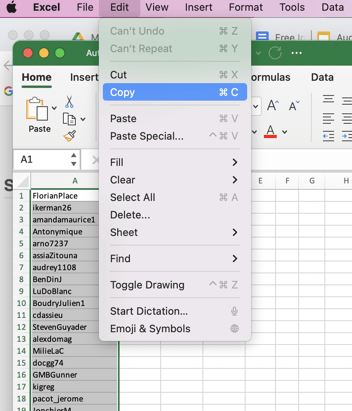
- The file needs to contain only 1 column with the list of User IDs, or author handles, one item per line. There are many ways to do this:
1. *Delete the rest of the data from the document, remove all other columns and rows, as well as column title*
2. *Simply copy and paste the user IDs or author handles into a new sheet (no column titles)*
**
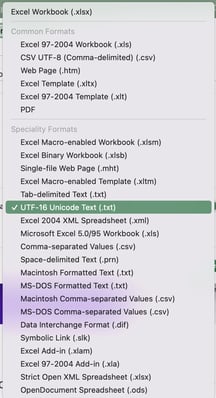
3. *Save the file as UTF Unicode Text (.txt)*
******
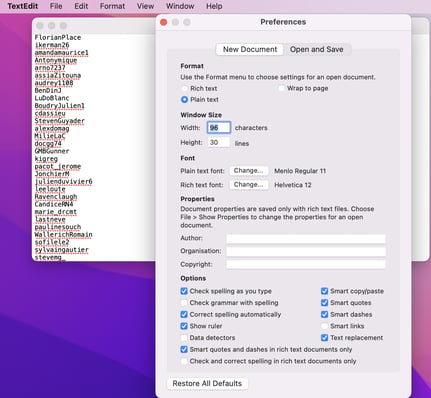
4. *OR Copy/paste the author handles or Twitter IDs (no column titles or spaces) straight into a tool such as TextEdit.*
**
5. *The file needs to contain **at least 100** individual IDs or handles and a **maximum of 1M**.*
6. *This means no duplicates. (\*You can easily remove duplicates on Excel by selecting the cells, then clicking on **Data\> Remove duplicates**)*
#### Now you are ready to upload!
**1. Save** the TXT file to your computer and then import back into Audiense Connect to create a new audience.
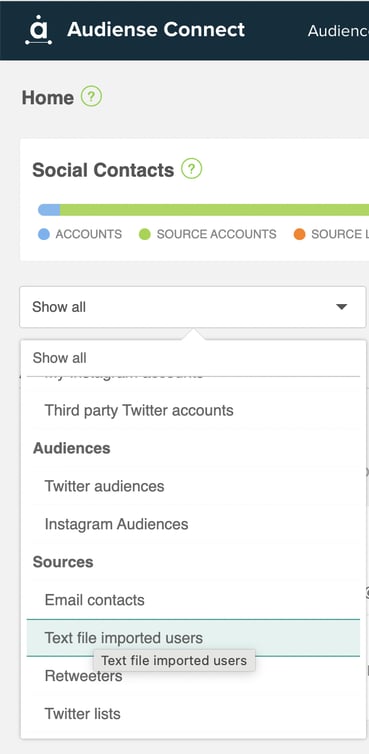
**2.** Select **Add contact sources** from the top Audiences menu, or click on **the + sign** under **Text file imported users** on the main dashboard as you scroll passed Audiences. This screen will appear:

**3**. Click **upload a file** and use the file explorer to search for and select the text file from your computer.
**4.** When the file has finished synchronizing, the new source panel will appear in the **Text file imported users** section of your **homepage**.
****
**Synchronization may take a while, but** you can navigate away from the source and continue using Audiense while you wait, and optionally you can receive an email notification once it is finished.
#### **Explore your new source (Audience)**
- Click on the top half of the panel (name) to access the **source's dashboard,** and click on all members to browse the community view.

- Or directly click on the bottom half of the panel (number of members) to access the **community view,** browse all members and carry out typical **community management actions**.

- Remember, you can also access any **source** via the source drop-down menu on the **top left of your homepage,** or even via the search bar to the right, if you know the name of the file you are looking for.
- You can use the **view** on your social contacts bar (if you are the account owner)

- [Getting Started](https://knowledge.audiense.com/en/knowledge/getting-started?hsLang=en#main-content)
- [Getting started with Audiense Insights](https://knowledge.audiense.com/en/knowledge/getting-started?hsLang=en#getting-started-with-audiense-insights)
- [Getting started with Audiense Connect (Twitter Marketing Plan)](https://knowledge.audiense.com/en/knowledge/getting-started?hsLang=en#getting-started-with-audiense-connect-twitter-marketing-plan)
- [Audiense Insights](https://knowledge.audiense.com/en/knowledge/audiense-insights?hsLang=en#main-content)
- [Audience Intelligence Reports](https://knowledge.audiense.com/en/knowledge/audiense-insights?hsLang=en#audience-intelligence-reports)
- [Audiense TikTok Insights](https://knowledge.audiense.com/en/knowledge/audiense-insights?hsLang=en#audiense-tiktok-insights)
- [Audiense Integrations](https://knowledge.audiense.com/en/knowledge/audiense-insights?hsLang=en#audiense-integrations)
- [Video Tutorials & Strategic Guides](https://knowledge.audiense.com/en/knowledge/audiense-insights?hsLang=en#video-tutorials-strategic-guides)
- [Audiences: types and definitions](https://knowledge.audiense.com/en/knowledge/audiense-insights?hsLang=en#audiences-types-and-definitions)
- [How our customers use Audiense Insights](https://knowledge.audiense.com/en/knowledge/audiense-insights?hsLang=en#how-our-customers-use-audiense-insights)
- [Audiense Connect](https://knowledge.audiense.com/en/knowledge/audiense-connect?hsLang=en#main-content)
- [Basic Navigation](https://knowledge.audiense.com/en/knowledge/audiense-connect?hsLang=en#basic-navigation)
- [Audiences](https://knowledge.audiense.com/en/knowledge/audiense-connect?hsLang=en#audiences)
- [Analytics](https://knowledge.audiense.com/en/knowledge/audiense-connect?hsLang=en#analytics)
- [Engagement](https://knowledge.audiense.com/en/knowledge/audiense-connect?hsLang=en#engagement)
- [Audiense Monitoring](https://knowledge.audiense.com/en/knowledge/audiense-connect?hsLang=en#audiense-monitoring)
- [Understanding your Account](https://knowledge.audiense.com/en/knowledge/understanding-your-account?hsLang=en#main-content)
- [Audiense Insights](https://knowledge.audiense.com/en/knowledge/understanding-your-account?hsLang=en#audiense-insights)
- [Feedback & Support](https://knowledge.audiense.com/en/knowledge/understanding-your-account?hsLang=en#feedback-support)
- [Audiense Connect: Twitter Marketing](https://knowledge.audiense.com/en/knowledge/understanding-your-account?hsLang=en#audiense-connect-twitter-marketing)
- [Plans & Billing](https://knowledge.audiense.com/en/knowledge/plans-billing?hsLang=en#main-content)
- [Payments & Cancellations](https://knowledge.audiense.com/en/knowledge/plans-billing?hsLang=en#payments-cancellations)
- [Add-ons](https://knowledge.audiense.com/en/knowledge/plans-billing?hsLang=en#add-ons)
- [How-to's & FAQs](https://knowledge.audiense.com/en/knowledge/how-tos-faqs?hsLang=en#main-content)
- [Audiense Insights How-to's](https://knowledge.audiense.com/en/knowledge/how-tos-faqs?hsLang=en#audiense-insights-how-tos)
- [Audiense Insights FAQs](https://knowledge.audiense.com/en/knowledge/how-tos-faqs?hsLang=en#audiense-insights-faqs)
- [Audiense Connect FAQs](https://knowledge.audiense.com/en/knowledge/how-tos-faqs?hsLang=en#audiense-connect-faqs)
- [Audiense Connect How-to's](https://knowledge.audiense.com/en/knowledge/how-tos-faqs?hsLang=en#audiense-connect-how-tos)
[-1.svg "Audiense Logo (1)-1")](http://www.buxtonco.com)
[mailto:email@email.com](mailto:email@email.com)
Copyright © 2026, Buxton