
Overview
Follow this article to learn about the Export for Ads feature in Audiense Insights.
Export for Ads allows you to transform the audience intelligence gathered in your Insights reports into actionable targeting criteria for advertising platforms. Rather than manually identifying interests and affinities, Audiense compiles the most relevant audience data into an easy-to-use Excel file that can be used when building advertising campaigns.
The exported data is designed to help you activate your audience across multiple advertising platforms by providing targeting criteria based on your audience's unique interests and affinities.
Note: Export for Ads is available only to customers with an Audience Insights plan. This feature is not available on Free or Twitter Marketing plans.
What Is an Export for Ads?
 An Export for Ads is an Excel workbook that contains a curated selection of data from your Audiense Insights report. Rather than exporting every insight from your report, the workbook focuses on the audience characteristics that are most useful when building advertising audiences. This includes segmented and unique affinities that can be applied across a variety of advertising platforms. The exported information can be used to create more targeted campaigns, develop audience segments, or build lookalike audiences to expand your campaign reach.
Supported Advertising Platforms
The targeting data included in the Export for Ads workbook can be applied across a variety of advertising platforms, including:
- X (formerly Twitter)
- YouTube
- Google Ads Network
- Demand-Side Platforms (DSPs)
By copying the exported targeting criteria into the audience targeting options available within these platforms, you can more quickly build campaigns that align with the interests identified in your Audiense report.
Where to Find Export for Ads
Once your Insights report has been generated, you can access the Export for Ads feature in two locations:
- From the Actions menu within your report.
- From the Media Affinity tab under Social & Display Ads.
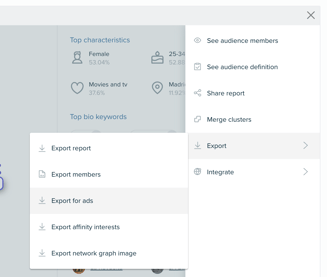
Selecting either option opens the export dialog where you can generate the workbook.
Exporting Audience Data
When you begin an export, Audiense displays which audience is being exported.
If you're viewing the Full Audience, the export will include targeting information for the entire report. If you're viewing an individual audience segment, only that segment's targeting data will be included in the export.
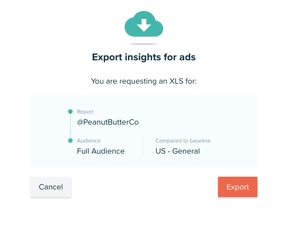
For campaigns that require more personalized messaging, consider exporting each audience segment separately. This allows you to build advertising campaigns tailored to the unique characteristics of each cluster rather than treating the audience as a single group.
Using the Exported Data
After downloading the Excel workbook, you can copy the relevant targeting criteria directly into the audience targeting options of your preferred advertising platform.
This workflow makes it easier to activate the audience insights you've discovered within Audiense and can also support the creation of lookalike audiences to expand your campaign reach while maintaining relevance.
Create More Effective Campaign Messaging
Export for Ads works particularly well when combined with the Personality tab of your Insights report. Within the Personality tab, you'll find the How to Create Effective Messaging guide located beneath the personality summary.
This resource provides messaging recommendations based on your audience's personality characteristics. By combining these messaging insights with the targeting criteria included in the Export for Ads workbook, you can create campaigns that are both well-targeted and better aligned with your audience's communication preferences.