---
title: Using the AI Report Builder
description: Learn how to use the AI Report Builder within Audiense to define audiences using natural language prompts instead of manually building audiences through filters.
---
[Skip to content](https://knowledge.audiense.com/en/soprism/using-the-ai-report-builder#main-content)
English
Show submenu for translations

Open main navigation
Close main navigation
- English
Show submenu for translations
- [Contact us](https://share.hsforms.com/1Q15CYppjRb-bFgd0CZZWwg4k1o4)
[Contact us](https://share.hsforms.com/1Q15CYppjRb-bFgd0CZZWwg4k1o4)
How can we help you?
- There are no suggestions because the search field is empty.
1. [Soprism Knowledge Base](https://knowledge.audiense.com/en/soprism?hsLang=en)
2. [Soprism Report Creation](https://knowledge.audiense.com/en/soprism/soprism-report-creation?hsLang=en)
# Using the AI Report Builder
## Learn how to use the AI Report Builder within Audiense to define audiences using natural language prompts instead of manually building audiences through filters
### **Overview**
Follow this article to learn how the AI Report Builder works and how it can help simplify audience creation workflows within the platform.
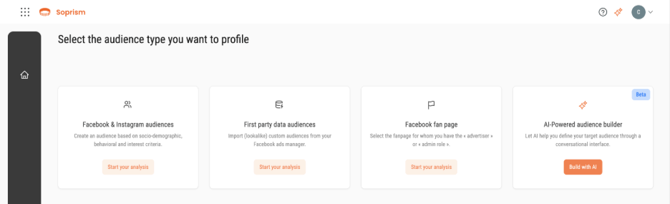
The AI Report Builder allows users to define audiences using freeform text descriptions instead of manually selecting filters and audience criteria. This helps streamline the report-building process by allowing users to describe the type of audience they want to analyze in natural language. After generating the audience definition, users can continue into the traditional report builder to finalize their audience configuration and launch the report.
---
### **What Is the AI Report Builder?**
The AI Report Builder is a guided audience creation experience that uses freeform text prompts to help generate audience definitions. Instead of manually configuring multiple audience filters from the beginning, users can simply describe the type of audience they want to build.
For example, users may describe:
- Audience interests
- Demographic characteristics
- Consumer behaviors
- Industry or niche focus areas
- Brand affinities
- Audience types
---
### **Using Freeform Audience Descriptions**
The AI Report Builder supports natural language input, allowing users to describe audiences in plain text. This removes the need to manually build the audience entirely from scratch using filters alone. Users can eithern enter a custom freeform audience description or select from available suggested audience prompts. These suggestions can help users quickly begin building common audience types or explore new audience ideas.
---
### **Benefits of the AI Report Builder**
The AI Report Builder helps simplify audience creation by reducing the amount of manual filtering required during the initial setup process. This workflow may help users:
- Build audiences more quickly
- Explore audience ideas more easily
- Simplify complex audience setup workflows
- Generate starting points for audience analysis
- Reduce manual configuration time
The feature is designed to make audience creation more accessible while still allowing users to refine and customize their reports before launch.
- [Access & Account Setup](https://knowledge.audiense.com/en/soprism/access-account-setup?hsLang=en#main-content)
- [Overview](https://knowledge.audiense.com/en/soprism/access-account-setup?hsLang=en#overview)
- [Access needed](https://knowledge.audiense.com/en/soprism/access-account-setup?hsLang=en#access-needed)
- [Soprism Account Setup](https://knowledge.audiense.com/en/soprism/access-account-setup?hsLang=en#soprism-account-setup)
- [Soprism Mindset Glossary](https://knowledge.audiense.com/en/soprism/soprism-mindset-glossary?hsLang=en)
- [Soprism Report Creation](https://knowledge.audiense.com/en/soprism/soprism-report-creation?hsLang=en)
- [Soprism Report Results](https://knowledge.audiense.com/en/soprism/soprism-report-results?hsLang=en)
- [Specific Useful Features](https://knowledge.audiense.com/en/soprism/specific-useful-features?hsLang=en)
- [Meta Understanding](https://knowledge.audiense.com/en/soprism/meta-understanding?hsLang=en#main-content)
- [Meta Ecosystem](https://knowledge.audiense.com/en/soprism/meta-understanding?hsLang=en#meta-ecosystem)
- [Custom Audiences](https://knowledge.audiense.com/en/soprism/meta-understanding?hsLang=en#custom-audiences)
- [Lookalike Audiences](https://knowledge.audiense.com/en/soprism/meta-understanding?hsLang=en#lookalike-audiences)
- [Facebook Fan pages](https://knowledge.audiense.com/en/soprism/meta-understanding?hsLang=en#facebook-fan-pages)
- [FAQs](https://knowledge.audiense.com/en/soprism/faqs?hsLang=en#main-content)
- [Account set up](https://knowledge.audiense.com/en/soprism/faqs?hsLang=en#account-set-up)
- [Audiences creation](https://knowledge.audiense.com/en/soprism/faqs?hsLang=en#audiences-creation)
- [Soprism platform](https://knowledge.audiense.com/en/soprism/faqs?hsLang=en#soprism-platform)
[-1.svg "Audiense Logo (1)-1")](http://www.buxtonco.com)
[mailto:email@email.com](mailto:email@email.com)
Copyright © 2026, Buxton