
Overview
Follow this article to learn how the AI Chat Assistant works within LinkedIn reports and how it can help simplify report analysis workflows.
The AI Chat Assistant allows users to ask detailed questions about their report using freeform text instead of relying entirely on manual dashboard navigation. This feature helps users quickly surface specific insights and audience information by interacting directly with report data through natural language prompts. The AI Chat experience is designed to complement the existing report interface, allowing users to combine conversational analysis with traditional dashboard exploration.
What Is the AI Chat Assistant?
The AI Chat Assistant is an AI-powered report analysis feature that allows users to interact with their LinkedIn reports using plain text questions.
Instead of manually navigating through report tabs and visualizations, users can ask direct questions about their report data and receive focused responses based on the contents of the report. The feature works similarly to the MCP connector by helping users narrow in on highly specific insights and audience information.
Users can either:
- Type custom questions using freeform text
- Select from available suggested prompts
This workflow helps streamline report exploration and reduces the need to manually search through multiple reporting sections.
Accessing the AI Chat Assistant
-
The AI Chat capability can be accessed directly from the bottom-right corner of your report interface. Once opened, users can immediately begin interacting with their report by entering questions or selecting from the available suggested prompts.
- (See Figure 1)
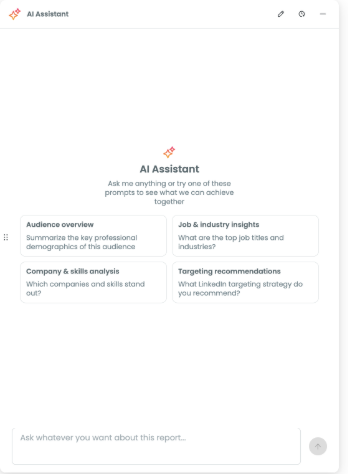
Figure 1
Using Natural Language Questions
The AI Chat Assistant supports conversational prompts that allow users to ask detailed questions about report data in plain language. This conversational workflow helps users focus on discovering insights rather than manually locating information throughout the report interface.
Users may ask questions related to:
- Audience behaviors
- Demographic trends
- Interests and affinities
- Engagement patterns
- Audience characteristics
- Report insights
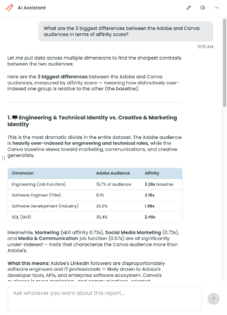
Combining AI Chat With Dashboard Navigation
The AI Chat Assistant is designed to work alongside the existing report and dashboard experience. Users can continue navigating through report tabs and visualizations while also using AI Chat to:
- Explore more detailed questions
- Clarify report findings
- Investigate trends more deeply
- Surface insights more quickly
Benefits of the AI Chat Assistant
The AI Chat Assistant helps simplify report exploration and insight discovery by allowing users to interact with reports in a more natural and conversational way.
This workflow can help users:
- Surface insights more quickly
- Ask highly specific questions
- Reduce manual dashboard navigation
- Explore report data more efficiently
- Improve overall report accessibility
The feature is designed to make report analysis more intuitive while still maintaining access to the full reporting experience within the platform.